How to check TIN Number online?
Looking for your TIN? Just log in to LHDN’s MyTax portal or open your SQL system. Your Tax Identification Number is only a few clicks away.

How to check TIN Number online?
Step 1
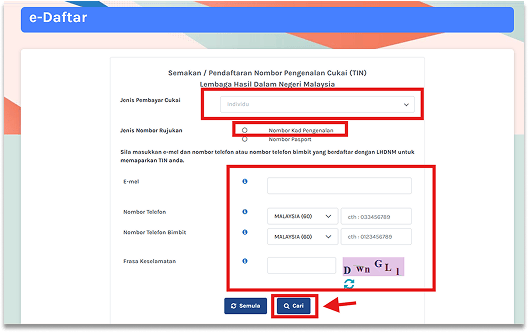
Go to mytax.hasil.gov.my
You can access e-Daftar
Step 2
Select the appropriate taxpayer category, such as an individual or a company
Then, fill in IC Number, Email, and Telephone Number
After that, enter the Security Phrase and click Search
Step 3
The system will display the registered income tax number (TIN) and the LHDN Branch details
Step 4
If you have never registered before or if you entered the wrong email or telephone number
You will not be able to find your income tax number
Instead, you will receive a message as shown in the image
Step 1
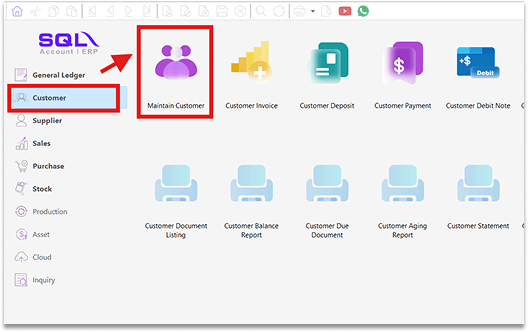
Use SQL Account
It can help you find the TIN you need
Go to Customer – Maintain Customer
Step 2
The system can help you search for the TIN Number
2.1 Enter the company name you want to search for
2.2 In the Reg. No field, put a wildcard symbol The system will search for the company’s SSM registration number
2.3 Click OK to confirm
2.4 At the same time, the TIN number will also be retrieved
Share This Page
Share
Tweet
Related Posts